
How to Choose the Perfect Laptop for Your Needs
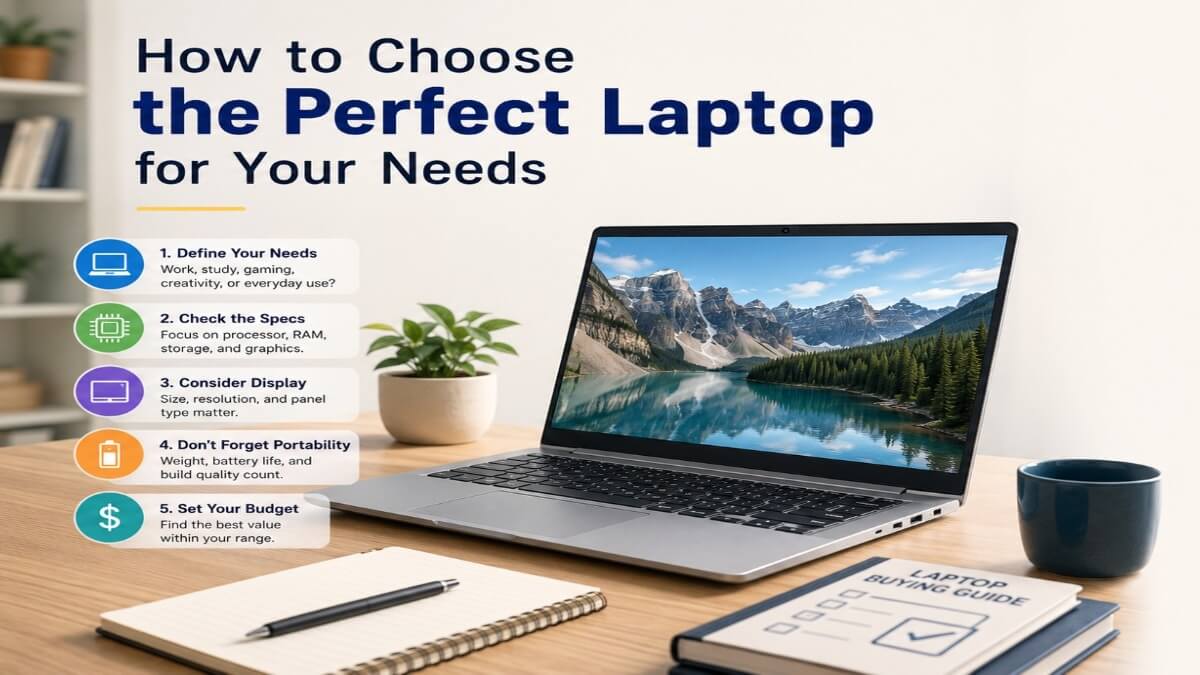
Introduction
In today’s fast-paced digital world, having a reliable laptop is no longer a luxury. It is now an essential part of our daily lives. Whether you are a student, professional, or freelancer, the right technology plays a big role in your success.
There are countless laptop models and brands on the market right now. As a result, choosing the best one for yourself can be difficult. It is very natural to get confused among so many technical terms and features.
Our guide will help you free yourself from that confusion. Here, we will discuss every important aspect of buying a laptop simply. After reading this guide, you will be able to confidently pick the perfect laptop for yourself.
Why Choosing the Right Laptop Matters
Selecting the right laptop means investing your money and time wisely. A wrong decision can frustrate you in the long run.
A laptop is a primary tool for our daily tasks. Therefore, you should choose a device capable of handling your current needs and future workloads.
If you buy a laptop with weak performance relative to your work, your work speed will drop. On the other hand, if you need a laptop for basic tasks, there is no point wasting money on an unnecessarily expensive gaming laptop.
How the Right Device Improves Productivity and Performance
The right device increases both the quality of your work and your speed. When your laptop boots up fast and runs without interruptions, your focus on work improves.
With a good processor and enough RAM, you can easily multitask or do several things at once. This saves your valuable time and removes work fatigue.
Additionally, a good keyboard and screen ensure your physical comfort. You will not feel tired even after working for long hours. Consequently, your overall productivity increases manifold.
Identify Your Purpose Before Buying a Laptop
The first and most crucial step in buying a laptop is understanding your own needs. Making a decision becomes much easier when you clearly know why you are buying it.
Laptops are built for different purposes. Therefore, not everyone’s needs are the same. Below, we discuss laptop requirements from the perspective of different users.
Laptops for Students
Students generally need laptops for assignments, presentations, and online classes. For them, portability and battery life are the most important factors.
A lightweight laptop that can hold a charge all day is ideal for students. This is because they frequently have to carry their laptops around campus or the library.
In terms of performance, a mid-range processor and 8 GB of RAM are sufficient for a student’s daily tasks. However, engineering or computer science students might need more powerful laptops.
Laptops for Business and Office Work
Data security and reliability are extremely necessary for office work. Business laptops typically feature advanced security options, such as fingerprint readers or iris scanners.
Multitasking is a common occurrence in this scenario. You have to juggle plenty of emails, spreadsheets, and presentations simultaneously. Therefore, a powerful processor and 16 GB of RAM are ideal for this type of work.
Also, a high-quality webcam and a clear microphone are desirable for video conferences. A comfortable keyboard greatly reduces the exhaustion of office work.
Laptops for Gaming and High Performance
Gaming laptops are built entirely differently from standard laptops. Their primary focus is on powerful processing and advanced graphics.
You will need a dedicated graphics card (GPU) to run modern games. Additionally, a high-refresh-rate display makes the gaming experience much smoother.
Gaming laptops generate a lot of heat. Therefore, they must have advanced cooling systems. However, they are usually a bit heavier and have comparatively shorter battery life. You can learn more details about gaming laptops from the PC Gamer Hardware Guide.
Laptops for Creative Work (Design, Video Editing, etc.)
Graphic designers, video editors, or 3D animators need a specific kind of laptop. The most crucial element for their work is color accuracy on the display.
In this case, you should choose a display that supports a 100% sRGB or DCI-P3 color gamut. In terms of performance, a powerful multi-core processor and plenty of RAM are mandatory.
A good graphics card is also highly essential for video rendering. Furthermore, fast SSD storage comes in very handy for saving large files.
Key Specifications to Consider
The true identity of a laptop lies hidden in its internal specifications. If you understand these technical aspects, you will never be deceived.
Let us discuss a few primary specifications of a laptop in simple terms.
Processor (CPU) Performance Explained
The processor or CPU is the brain of the laptop. How fast your laptop works depends heavily on this processor.
Currently, two companies dominate the processor market: Intel and AMD. For regular tasks, an Intel Core i3 or AMD Ryzen 3 is sufficient.
However, if you want to multitask or do slightly heavier work, choosing a Core i5 or Ryzen 5 is a smart move. For professional work or gaming, Core i7, Core i9, or Ryzen 7 processors provide the best performance. You can check the Intel website to learn about processor benchmarks.
RAM: How Much Do You Actually Need?
RAM is your laptop’s short-term memory. The laptop stores the data for the tasks you are currently performing in the RAM.
The more RAM your laptop has, the more tasks you can run smoothly at the same time. Nowadays, 4 GB of RAM is practically useless for anything beyond very basic tasks.
It is best if you choose at least 8 GB of RAM. But if you are a designer or gamer, 16 GB or 32 GB of RAM is mandatory.
Storage Options: SSD vs HDD
Storage is where all your files, photos, and software are permanently saved. There are two main types of storage in laptops today: HDD and SSD.
An HDD (Hard Disk Drive) is an older technology. It is slow and carries a higher risk of damage.
On the other hand, an SSD (Solid State Drive) is much faster and more durable. Laptops with an SSD boot up within seconds. You should definitely choose a model with SSD storage when buying a laptop.
Graphics Card (GPU) for Gaming and Design
The graphics card, or GPU, handles the visual or image-related tasks on your laptop. The integrated graphics that come with the processor are enough for regular video watching or web browsing.
However, if you want to play games or edit videos, you will need a dedicated graphics card. NVIDIA and AMD are the two main manufacturers of dedicated graphics cards.
NVIDIA’s RTX series cards are currently the most popular in the market. It is important to choose the right graphics card model for your work.
Display Quality and Screen Size
You have to do all your work looking at the laptop screen. Therefore, a good quality display can make your work experience much more enjoyable.
A bad display can harm your eyes. So, it is essential to keep a few things in mind when selecting a display.
Choosing the Right Screen Size for Your Needs
Laptop screen sizes generally range from 11 to 17 inches. 13- or 14-inch laptops are the most convenient to carry around.
15.6 inches is the most popular and standard size. It maintains a wonderful balance between portability and screen real estate.
On the other hand, 17-inch laptops are mainly used as desktop replacements. People who edit videos or play games often prefer larger screens.
Full HD, 4K, and Refresh Rates Explained
The higher the screen resolution, the clearer and sharper the image will look. Currently, Full HD (1080p) resolution is the minimum standard for laptops.
For those who do professional design or video editing, a 4K resolution display is incredibly useful. However, 4K displays drain the laptop battery very quickly.
The refresh rate measures how many times the screen updates per second. A 60Hz refresh rate is enough for standard work. But for gaming, a display with a 120Hz or 144Hz refresh rate is necessary.
Touchscreen vs Non-Touchscreen Laptops
Many laptops today come with touchscreen features. These are often called 2-in-1 laptops because they can be used like tablets.
If you love drawing or do a lot of presentation work, a touchscreen might be convenient for you.
However, touchscreen laptops cost more than regular laptops. Also, they consume more battery power. So, if you do not strictly need it, it is better to buy a non-touchscreen laptop.
Battery Life and Portability
For people who spend the whole day outside with their laptops, battery life and laptop weight are two extremely important factors.
Carrying a heavy laptop on your shoulders is quite painful. Moreover, the constant worry about charging ruins your concentration.
How to Select a Laptop with Long Battery Life
Laptop manufacturing companies often make big claims about battery life. However, in real-world usage, those claims frequently fall short.
To understand battery life, you have to look at the battery capacity, which is measured in watt-hours (Wh). Generally, a 50 to 70 Watt-hour battery can provide good backup in a medium-sized laptop.
If you need a lot of battery backup, you can consider Intel Evo platform laptops or Apple MacBooks. Their battery management is of very high quality.
Lightweight Laptops for Travel and Easy Portability
For avid travelers or field workers, ultrabooks or lightweight laptops are the best options. Their weight usually ranges from 1 to 1.5 kilograms.
To reduce weight, these laptops often lack DVD drives or extra ports. However, their build quality is quite premium.
Laptops made of magnesium alloy or carbon fiber are not only lightweight but also much more robust.
Operating System: Windows, macOS, or ChromeOS
The operating system is the core software of your laptop. It acts as a bridge between the hardware and your other software.
Choosing the right operating system depends on your personal preference and the type of work you do. There are primarily three operating systems commonly seen in the market.
Pros and Cons of Windows Laptops
Windows is the most popular operating system in the world. Its biggest advantage is that it supports almost all types of software.
Microsoft’s Windows operating system is available on laptops of all budgets. For gamers, Windows is the only ideal choice because all games are built for it.
However, the risk of virus and malware attacks is slightly higher on Windows. Also, the Windows operating system can become a bit sluggish over time.
Why Choose a MacBook (macOS)
macOS is Apple’s proprietary operating system, available only on its MacBook laptops. Its biggest feature is its fantastic security and stability.
For people who use an iPhone or iPad, a MacBook creates a wonderful ecosystem. MacBooks are extremely popular among creative professionals.
However, MacBooks are very expensive. Also, many Windows software programs and games do not run on macOS, which can be a major problem for many users.
Is a Chromebook Right for You?
Chromebooks are powered by Google’s ChromeOS. It is a web-based operating system that is very lightweight and fast.
For students or those whose work is limited to web browsing and document editing, Chromebooks are great alternatives. They are much cheaper and have almost no risk of viruses.
However, you cannot install heavy Windows or Mac software on a Chromebook. Furthermore, many Chromebook features do not work without an internet connection.
Build Quality and Design
When buying a laptop, many people only focus on the internal specifications. But the laptop’s exterior or build quality is equally important.
A durable laptop can be your companion for a long time. Let us learn some important aspects of build quality.
Durability and Material Quality
Laptops are usually made of plastic, aluminum, or various metal alloys. Cheap laptops generally use polycarbonate plastic.
Premium laptops have aluminum bodies, which look beautiful and are much more durable. If you frequently travel with your laptop, choosing a metal-body laptop is a wise decision.
You should carefully check the laptop’s hinges. A high-quality hinge provides a smooth feel when opening and closing the laptop.
Keyboard, Trackpad, and User Experience
The laptop’s keyboard and trackpad are your primary input devices. If you type a lot, a comfortable keyboard is essential.
The key travel or depth of the button press on the keyboard should be accurate. Besides, a backlit keyboard makes it very convenient to type in the dark.
The trackpad should be sufficiently large and sensitive. Trackpads with Windows Precision drivers work the most accurately.
Connectivity and Ports
Although wireless connectivity is popular in the modern era, having essential ports is highly necessary. Ports are needed to connect various external devices to the laptop.
The more diverse the ports on your laptop, the more advantages you will get.
USB, HDMI, and Thunderbolt Ports Explained
The USB port is the most common port on a laptop. Currently, the USB Type-C port is the most popular because it can transfer data and charge the laptop.
You can directly connect the laptop to a monitor or projector using an HDMI port. This is very useful for presentations or watching movies on a big screen.
The Thunderbolt port is the most modern and fastest. Through it, you can easily connect multiple 4K monitors or external graphics cards.
Wireless Connectivity Options (Wi-Fi, Bluetooth)
A laptop is almost useless without wireless connectivity. The laptop should have Wi-Fi 6 or Wi-Fi 6E support to enjoy high-speed internet.
You can easily connect a wireless mouse, headphones, or keyboard via Bluetooth.
Having the latest version of Bluetooth keeps device connections much more stable and reduces battery consumption.
Budget and Value for Money
Setting a budget is one of the hardest tasks when buying a laptop. The more money you spend, the better specifications you will get.
But not everyone’s needs are the same. Therefore, some ways to choose the best laptop within your budget are discussed below.
Best Laptops in Different Price Ranges
Entry-level laptops are generally built for everyday basic tasks. Their prices are quite affordable. They are suitable for students or casual users.
In mid-budget laptops, you will get a good processor, excellent display, and premium build quality. Most professional tasks can be done effortlessly with these laptops.
Premium laptops are primarily designed for high-end gaming or professional video editing. They include all the benefits of the latest technology.
Balancing Performance and Cost
When buying a laptop, you must ensure that you get the proper value for every penny spent. Spending extra money just looking at a brand name is not a smart move.
Focus on the features essential to your work. Do not pay extra for unnecessary features that you will never use.
Sometimes, laptops with slightly older-generation processors are available at much lower prices, which might be perfectly suitable for your current work.
Brand Reliability and After-Sales Service
A laptop is an expensive electronic device that can break down at any time. So, before buying, it is crucial to know the brand’s reputation and the quality of its after-sales service.
A good brand does not end its responsibility just by selling a laptop. They provide support to the customer for a long time.
Most Trusted Laptop Brands
In the global market, HP, Dell, Lenovo, Asus, and Apple are the most popular and reliable laptop brands. Every brand has its own specialties.
Dell and Lenovo are famous for their durable business laptops. On the other hand, Asus is doing strong business in the gaming laptop market.
Apple is customers’ first choice for its premium design and long-lasting performance. When choosing a brand, verify its presence in your local market.
Warranty and Customer Service Considerations
You should definitely read the warranty policy carefully when buying a laptop. Usually, laptops come with a one or two-year warranty.
It is important to know if there is an authorized service center for that brand near you. This makes it possible to get the laptop repaired quickly if it breaks down.
Many brands offer the option to extend the warranty period for an extra fee. For expensive laptops, taking this facility can be an excellent decision.
Common Mistakes to Avoid When Buying a Laptop
Buyers often make common mistakes when purchasing a laptop, which they later pay for. Being aware of these mistakes will help you make a correct decision.
Let us find out what those mistakes are and how to avoid them.
Ignoring Future Upgrade Needs
The RAM and storage of many laptops are soldered to the motherboard. As a result, you will not be able to upgrade them even if your needs increase in the future.
Therefore, before buying a laptop, make sure it has space to add extra RAM and storage.
If there is no scope for an upgrade, you should buy a model with slightly more RAM and storage right from the start.
Paying Extra for Unnecessary Features
Many laptops have 4K displays or extra touchscreen features that offer little benefit in regular work.
Because of these features, the laptop’s price increases significantly, and the battery drains quickly.
If you do not really need these features, do not waste extra money on them.
Prioritizing Style Over Performance
It is good for a laptop to look beautiful, but its internal capabilities are much more important than its external beauty.
Often, thin and beautifully designed laptops have weak cooling systems. As a result, the laptop gets overheated easily when doing slightly heavy work.
Therefore, when buying, you should focus more on performance, the cooling system, and design.
Tips for Making the Final Decision
Even after knowing everything, many people hesitate to make the final decision. Following a few tips below will make your decision-making much easier.
Comparing Different Models Before Buying
Make a list of several laptops within your budget. Then compare their specifications and prices.
Various websites and tech blogs offer tools to compare two laptops side by side. Using these, you can easily understand which laptop is more profitable for you.
Reading Reviews and User Feedback
Before buying a laptop, it is extremely urgent to check the reviews of that model on YouTube or tech sites. You can get an idea of the laptop’s real-world performance from reviews on reputable websites like TechRadar.
Also, reading the opinions of those already using that laptop lets you know about its long-term issues.
Customer ratings and reviews on e-commerce sites can greatly help you make your final decision.
Frequently Asked Questions (FAQs)
Which is the best laptop for everyday use?
For everyday tasks like browsing, watching YouTube, or checking emails, any laptop with an Intel Core i5 or AMD Ryzen 5 processor, 8 GB RAM, and a 256 GB or 512 GB SSD is ideal. Laptops from the Asus VivoBook or Lenovo IdeaPad series are great for this work.
How much RAM will I need in 2026?
According to software and browser requirements in 2026, having at least 8 GB of RAM is essential, even for basic tasks. But if you want to multitask, code, or do heavy work, having 16 GB of RAM is the safest bet.
Is an SSD better than an HDD for a laptop?
Yes, an SSD is many times better for a laptop. An SSD can transfer data much faster than an HDD. Using an SSD makes the laptop boot up quickly, and software runs smoothly. Furthermore, an SSD is not easily damaged.
Which is the best laptop for students?
Students need a lightweight laptop with long-lasting battery life. The MacBook Air is highly popular among students for its battery life. On Windows, the Acer Swift or HP Pavilion series is a good alternative.
How long will a good laptop last?
A good-quality laptop can generally be used comfortably for 4 to 5 years. However, if you take proper care of the laptop and clean it regularly, it can last 7 to 8 years or longer.
Conclusion
Buying a new laptop is a very exciting experience. However, without the correct information, this experience can turn into disappointment. We hope this guide has helped you understand every technical aspect of buying a laptop.
Final Advice for Choosing the Perfect Laptop
Finally, remember that the most expensive laptop will not necessarily be the best for everyone. The laptop that can meet your work style and needs is the best one for you. Do not rush when buying a laptop.
A Smart and Future-Proof Purchase
Technology changes very rapidly. So, ensure that the laptop you buy today can keep up with your work for the next few years. Best wishes on your laptop purchasing journey.